Where to check transaction status and their meanings?
Remitbee always wants to keep you updated. Logging into your account and visiting your 'Transaction History' will allow you to track your transaction at any time. You will also receive email notifications at every step as your transaction is being processed.
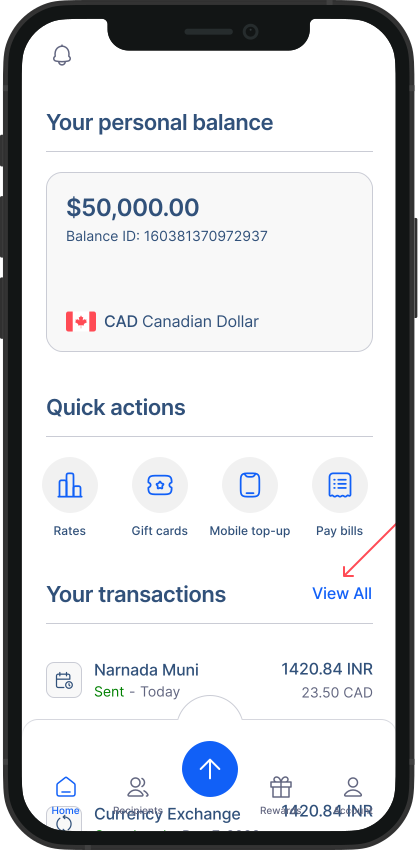
- Go to transaction history: From the home screen, you can see your recent transactions. To access all you older transactions, click on "View all".
- In the list, you'll find key information for each transaction, such as the date, amount, and status. You can search for transactions or filter them based on your preferences.
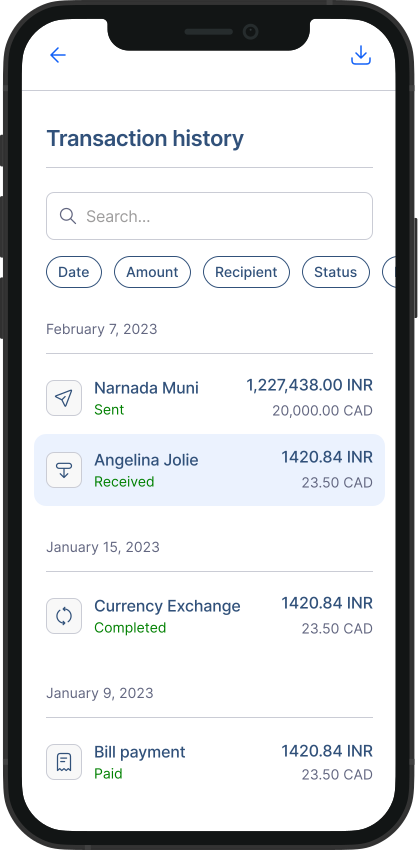
Following are the possible Transaction status, you can expect as your Transaction process.
In- progress You have initiated your transaction and it is has been sent to the Remitbee operational team
Release- Remitbee has released the funds to the recipient bank
Completed - Recipient bank has accepted and deposited funds to receiver
Hold - Transaction Funds are on hold by RemitBee
Refund in progress - You have requested a refund and it is in the progress of refunding
Refunded - Your transaction payment has been refunded
Contact us - Issues with your transaction. Request from RemitBee to contact us