How to cancel a transaction?
Steps to cancel transaction
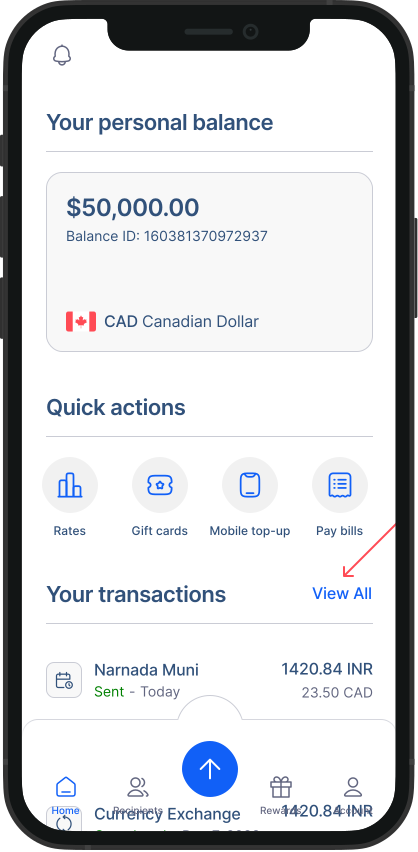
- Go to transaction history: On the home screen, you’ll see your recent transactions. Click on "View all" to access the complete list on the transaction history page.
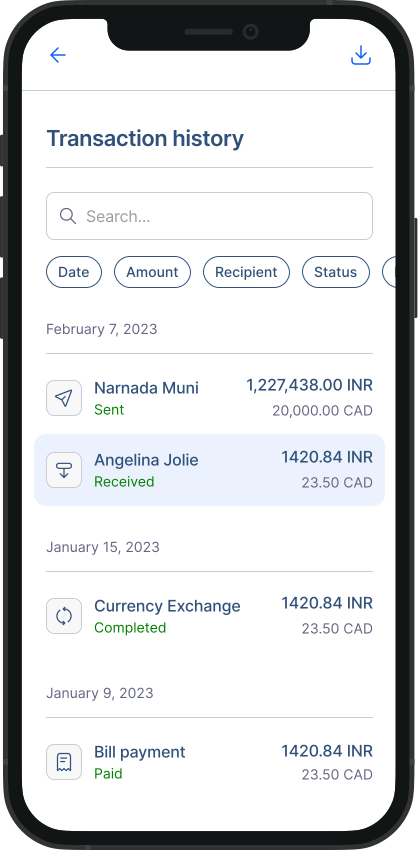
- Select the transaction: Find and click on the transaction you wish to cancel.
- Cancel the transaction: Look for the cancel button and click on it to initiate the cancellation.
Important Notes
Time limit: You typically have 10 minutes from creating the transaction to cancel it.
Completed transactions: If the cancel button is unavailable, it means the transaction has already been completed, and a refund cannot be issued at this stage.
Issues with recipient receiving funds: If the money hasn’t reached the recipient and you can’t cancel the transaction, you can raise a complaint directly from the ‘Transaction’ page. We’ll look into it and help resolve the issue.
Remember, our customer support team is here to assist you if you encounter any difficulties or have questions about canceling a transaction.