How to send an e-Transfer to RemitBee
Pay for your transfer by sending RemitBee an Interac e-Transfer from your online banking. Here's how.
Good to know: Verify the email your bank sends e-Transfers from on your RemitBee account first, so we can recognize your payment automatically. See How to set up Verified e-Transfer Emails.
How to send your e-Transfer
1. Set up your transfer: Sign in to RemitBee, tap Send Money, and set up your transfer. When you choose a payment method, select e-Transfer.
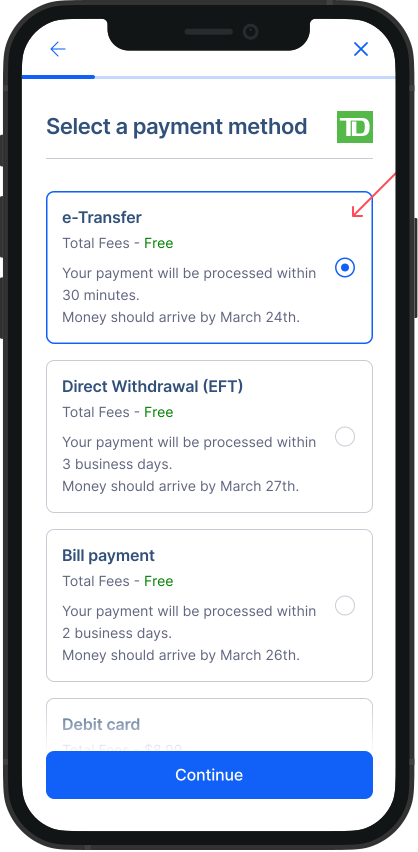
Review and confirm: Check your transfer details and tap Confirm.
Open your online banking: Go to your bank's app or website and start an Interac e-Transfer.
Enter RemitBee's details: Send the e-Transfer to the email address shown in the RemitBee app, for the exact amount shown. Send it from one of your verified emails.
Send it: Complete the e-Transfer in your online banking.
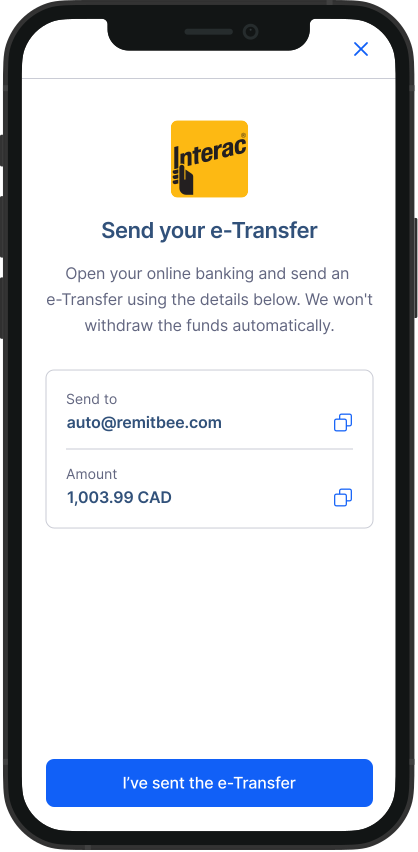
Important: Use the exact email shown in the app. Personal accounts send to [email protected]; business accounts send to [email protected]. The money must come from your own account, in your name — payments from anyone else won't be accepted.
We usually receive e-Transfers within 15 minutes. As soon as your payment arrives, we'll start your transfer and keep you updated at every step.
Congratulations! You've successfully sent your e-Transfer to RemitBee.