How to use Rewards ?
After you have earned rewards through a referral program, or applied a promocode to get them, you can use rewards towards your transfer. Here's a simple guide on how to apply your rewards to a transfer:
How to use your rewards
Start your transfer: Initiate a new transfer, enter all the details as you always do, and proceed to the Transfer Summary screen.
Apply your rewards: At the bottom of the Transfer Summary page, look for the option that says “Apply Rewards”. This is where you can use the rewards you've earned or received through promocodes.
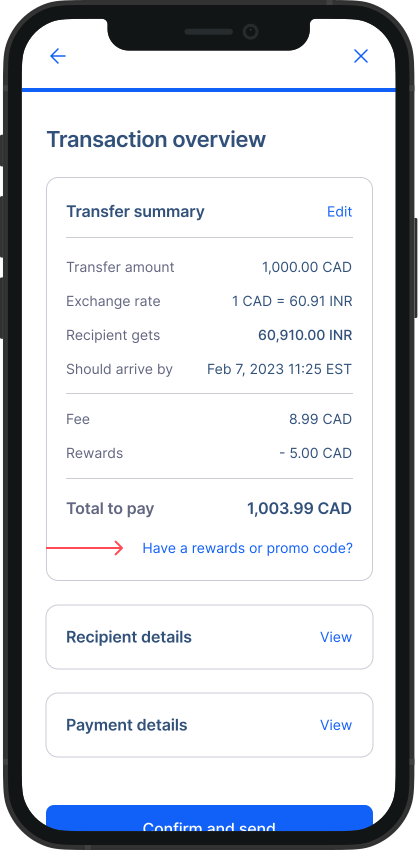
- Enter reward amount: Type in how many reward dollars you want to use for this specific transfer. It could be all or just a portion of your rewards balance, depending on your needs.
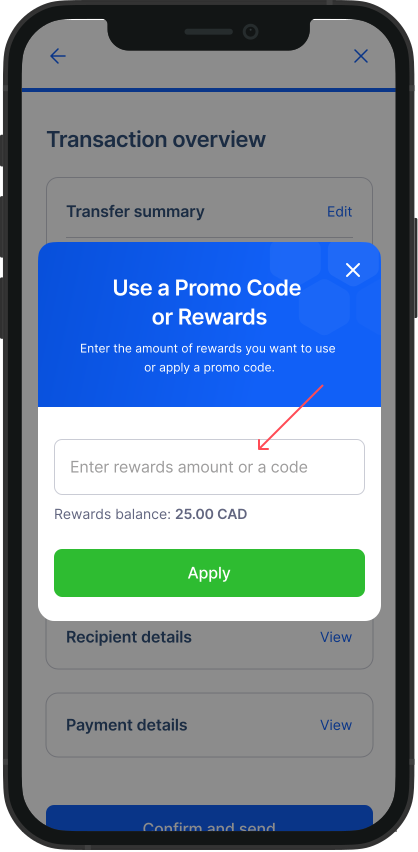
- Review and confirm: After applying your rewards, the total amount you need to pay will be updated to reflect the discount. Take a moment to review your transfer details once more, and if everything looks good, confirm and send it off! Important Note
Minimum Transfer Amount: Remember, the minimum amount that you can send with Remitbee is 10$. The initial $10 will not be covered by rewards, but will be credited to anything above $10.
By following these steps, you can easily make use of your RemitBee rewards, making your money transfers even more cost-effective.