Where to find RemitBee Tax and your tax returns
Tax season is over, so we've moved File tax off your main dashboard and into your Account to keep things tidy. Don't worry — nothing's gone. Here's how to find it.
Why File tax moved
File tax is a seasonal feature. Outside of tax season, you can't start a new filing, but everything you filed with RemitBee is still safe and available anytime in your Account. Filing will return to the same place when the next tax season opens.
How to find File tax
1. Log in: Open the RemitBee app, or sign in on the web platform.
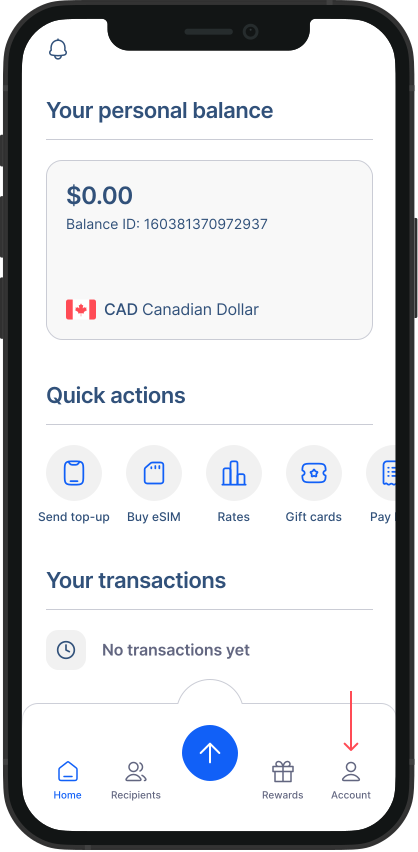 2. Open your Account: In the app, tap the Account icon in the bottom navigation. On the web, click your profile menu in the top-right corner.
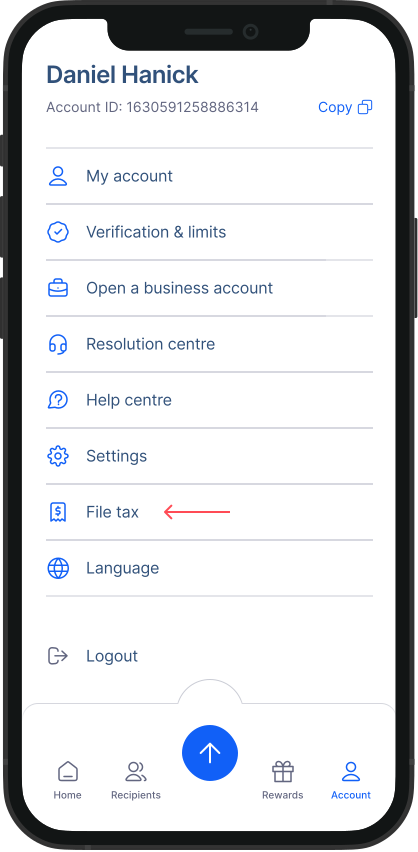
- Select File tax: In your Account, find and tap File tax.
- File or view your returns: From here you can file your taxes when filing is open, or view and download all the tax returns you've filed with RemitBee. > Good to know: Your past tax returns are always available to view and download, even when filing is closed for the season.